Why Blue Yeti Podcasting Microphones Are Not A Good Choice cover

I have to admit my Podcasting Microphone Pet Peeve: The Blue Yeti Mic. Recently I attended a coaching group meetup, and the presenter was a consultant who also considered herself a podcasting expert. And it was put to us in dogmatically certain terms that "The Blue Yeti Podcasting Mic Is Simply The Best Microphone For Podcasters". And in this post it is my solemn duty to disabuse our dear prospects and Yeti fans of this notion.

First of all: There is no such thing as a Blue Yeti Podcasting Mic. It is simply the Blue Yeti Mic. At the coaching meetup I kept my mouth shut, but it was hard. And, this is not the first time I heard this, and we have worked with lots of podcast clients who approach us with initial Blue Yeti podcasting pride.

Microphone Talk

Microphone talk is a favorite topic among podcasters, and mostly beside the point.

Great microphones never guarantee a great podcast.

But the blind devotion that the Blue Yeti seems to inspire among novice podcasters has always been a source of mystery for me. The Blue Yeti may be an excellent microphone, technically speaking. But it is usually the wrong choice for podcasting, for the following reasons:

Why the Blue Yeti Podcasting Microphone Is Often The Wrong Choice For Podcasters:

Blue Yeti Podcasting Microphone Is Often The Wrong Choice
Photographer: Jon Tyson | Source: Unsplash

The Blue Yeti is a Condenser Mic

It is a condenser mic, not a dynamic mic. Condenser mics will pick up sounds a mile away, and there are indeed valid concerns around air conditioners running etc. 

This also means they pick up the sound of the room.

If you are recording in a kitchen, bathroom or basement, the sound of the room, and the reverberations in it, will be super apparent.

There is no way to remove reverberation once recorded. So for your ghost story podcast the "basement sound" might be ideal. In most other cases, not so much.

‘The Blue Yeti in particular, in spite of its sexy switches and cardioid pattern option, is “roomy” sounding, not what you want for distraction free and intimate sounding audio. Being able to switch the pickup pattern helps a little, not a lot.

A large and unwieldy form factor

The Blue Yeti is heavy, large, and cannot easily be mounted on a boom arm, which is necessary to move it close enough to your mouth as you record.

Most people make the mistake of leaving the Yeti on its stand positioned on their desk, 1-2 feet from their mouth – instead of having it inches away from their mouth.

A desk stand Yeti is never going to sound great, unless you are in a sound isolated booth or purposefully built studio. 

The Yeti is an expensive choice, once you buy the shock mount and boom arm and pop filter needed to use it in a “podcasting setup” – in other words close to your mouth. So if you add these pieces, you might as well get a “proper” podcasting mic.

What About The Yeti Pro?

The Yeti Pro is an upgraded (and also much more expensive) version of the Yeti. It improves on the hit original Yeti USB microphone with a stereo balanced XLR output, and professional 192 kHz/24-bit digital audio over its USB out.

The Yeti Pro is indeed an improvement, but still a condenser microphone — which is the fundamental Yeti problem for most podcasting use cases.

So it’s great to be able to connect to a standard XLR preamp, mixer, or audio interface, but the “roomy” sound quality will be there just the same. And mounting it on boom arm stands is still as difficult and unwieldy as with the original.

What about the Yeti Nano?

The Blue Yeti "Nano" Microphone may be "nano," but it's still a pretty large microphone.

In a soundproof studio or a treated room, the Blue Yeti Nano could work for podcasters, but there are likely better condenser microphones available for podcasting.

The Nano is essentially a slightly more compact version of the original, which is a bit of a chuckle in itself. So, if you're looking for a top-quality podcast microphone, it might be worth seeking alternatives in the sea of wonderful podcasting gear.

The Advantages Of Dynamic Mics

Dynamic mic advantages compared to Blue Yeti Podcasting Mics
Photographer: Bogomil Mihaylov | Source: Unsplash
  • Dynamic mics on the other hand reject much of the background noise and are ideal for podcasting.
  • They are also less costly.
  • They are easy to mount on a boom arm, a must have for podcasters in getting their mics close enough while also being comfortable.
  • Lastly there are options with BOTH XLR professionally grounded cables, as WELL AS USB connectivity.

One last thing: USB connections will seldom be enough for a strong enough recording signal, for either dynamic or condenser mics with built in USB connectivity.

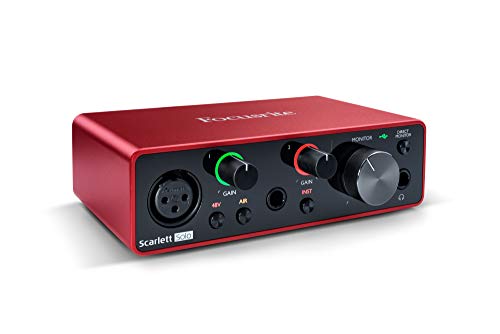
Better sound quality comes from a XLR condenser mic not directly connected to your PC or Mac directly, but going through a small desk USB pre-amp like the Focusrite in the equipment list below. Here is a direct link to what most of our podcast clients use (a budget conscious version, the mic is $79): 

Podcast on YouTube Starter Kit — Extended Edition

Podcast on YouTube Starter Kit — Extended Edition

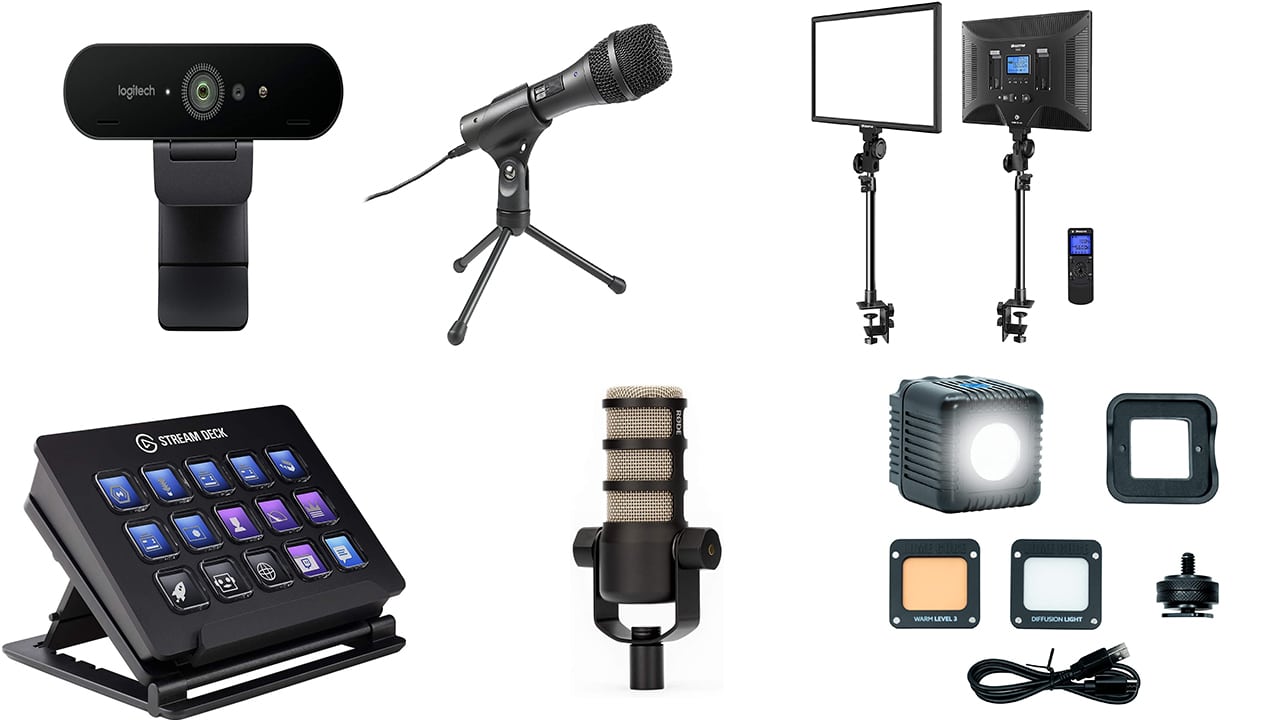
The Podcast on YouTube Starter Kit – Extended Edition is a comprehensive setup designed for recording and streaming quality video podcasts with YouTube as the primary platform.

Podcast on YouTube Starter Kit — Extended Edition
This podcasting setup has all the gear you need to record/stream quality video podcasts. This setup was made with youtube being your primary platform in mind. First Choice For Microphone
Our Pick For Best Budget Microphone
Rode PodMic Cardioid Dynamic Podcasting Microphone
$85.00

At Polymash this microphone is our choice for "budget" only because it is so affordable. Really the quality of this mic places it into mid-range to higher end microphones, and the fact that it has a pop filter and shock mount built in are a great plus as well as a money saver.

Buy Now Explore Details
We earn a small commission if you click this link and make a purchase at no additional cost to you.
10/19/2026 07:00 pm GMT
Alternate Choice For Microphone
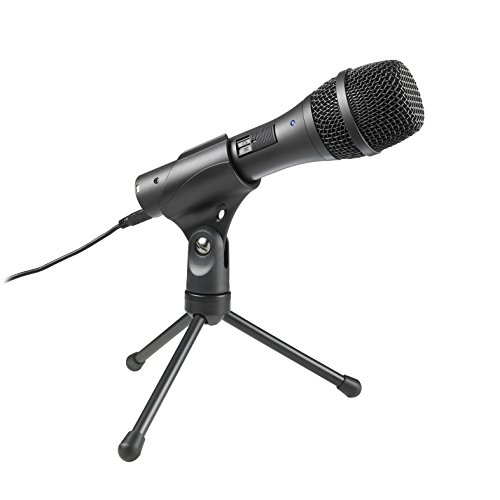
Audio-Technica AT2005USB Cardioid Dynamic USB/XLR Microphone
$79.00

Often recommended by our fellow podcasters, these microphones are our former pick, and still a great starter choice.

Most importantly, they are Dynamic mics. This means they reject background noise and are perfect for studio that are not sound-proofed. They need to be quite close to the speaker's mouth, as is true with all dynamic microphones. Therefore they require mounting on a boom arm. I also recommend using a shock mount as this improves sound quality and eliminates desk banging noises.


- These come with XLR audio cables long enough for a 2 person interview setup

- They also include a desk stand, which we will likely NOT use, but is handy for mounting the Zoom H6 recorder.

- These can be plugged directly into a computer with the USB port, and plugged into the Zoom recorder using the XLR cables.

- However, for much improved quality I would recommend using these with XLR cables and a good USB pre-amp to connect to your Mac or PC.


Buy Now
We earn a small commission if you click this link and make a purchase at no additional cost to you.
10/20/2026 04:00 pm GMT
Computer Interface
Lights and Desk Clamps
Lume Cube 2.0 | Adjustable Daylight Balanced LED Light | for Photo and Video, Content Creation
$89.99

The lighting tool for creators designed to go anywhere and tackle any challenge. Meticulously crafted to meet our standards for small size and powerful impact, the lightweight and travel-ready Lume Cube 2.0 stands just 1.6” tall and packs enough power to light up a room.

Buy Now
10/20/2026 05:00 pm GMT
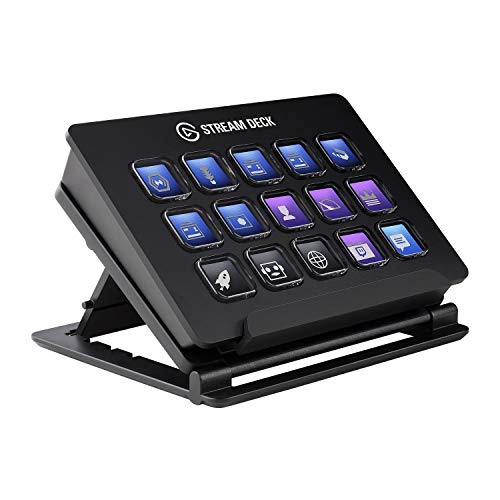
Stream Deck Toggle mics, switch scenes in OBS, play sounds, and trigger actions in other tools with a stream deck to make streaming more seamless
Elgato Stream Deck - Live Content Creation Controller

Stream Deck puts 15 LCD keys at your fingertips for ultimate studio control. Simply tap to switch scenes, launch media, tweet your feats and more. Personalize your keys with custom icons or choose from hundreds, and get visual feedback every time you execute a command. With Stream Deck, maximize your production value and focus on what matters most: your audience. Interface Integrated USB 2.0 cable.

Buy Now
We earn a small commission if you click this link and make a purchase at no additional cost to you.
15 LCD keys: Tap to switch scenes, launch media, adjust audio and more Fully customizable: Personalize keys with custom icons or choose from hundreds Direct integration: Control game capture, OBS, XSplit, TipeeeStream, Twitch, YouTube, Mixer, and more Easy setup: simply drag and drop actions onto keys in the app Unlimited control: Nest folders within folders to store as many actions as you want Camera
Logitech Brio Ultra HD 4K Webcam for Video Calls, Recording and Streaming
$169.99

Logitech BRIO is packed with features that produce stunning video in any environment. Our first 4K ultra high-def camera offers 5x digital zoom and RightLight™ 3 with HDR. Background replacement gives you the freedom to meet anywhere.

Buy Now
We earn a small commission if you click this link and make a purchase at no additional cost to you.
10/20/2026 01:00 pm GMT
…
podcastingresourcesguide.com

It includes the Rode PodMic Cardioid Dynamic Podcasting Microphone, which boasts a built-in pop filter and delivers rich sound quality. Also included are the Audio-Technica AT2005USB Cardioid Dynamic USB/XLR Microphone, the Focusrite Scarlett Solo (3rd Gen) USB Audio Interface, the Dazzne Desk Mount LED Video Light C-Clamp Stand Kit, and the Lume Cube 2.0 Adjustable Daylight Balanced LED Light. To make streaming more seamless, there is an Elgato Stream Deck for controlling various actions, and for video, the kit has a Logitech BRIO Ultra HD Webcam.

Determined to use the Yeti?

So I am sorry if some of the above is unwelcome news. 

And if you are committed to using a Blue Yeti, feel free to ignore this advice and read on for some tips to at least get the most out of it.

I do not know why the Blue Yeti inspires such devotion among some people. I have yet to meet a podcaster with more than 10 episodes under their belt that still has it. But for podcasters that inherited the device , or are not able to spend money on a new mic, here are some tips to make the Blue Yeti work better:

Tips to Make The Blue Yeti Work For Podcasting

Recording in a closet with a Blue Yeti
Photographer: Adrienne Leonard | Source: Unsplash

1. Work in a sound-proof studio or sound treated room

If you have a sound proof, purposefully built studio to record in, ignore this post, your Blue Yeti will work fine.

  • Then again, if you have a purposefully built studio, you are extremely unlikely to own (or want to use) a Blue Yeti in the first place.

2. Record inside or in front of a closet

If you have a small closet, are not claustrophobic and comfortable in small spaces, your Yeti will work.

Actually, I’m serious about working in (or near) a closet. But here is the thing:

  • You should not be facing the closet, you should actually have it close behind you. This is because when you speak into a mic it will pick up your voice and noises and sound from what’s BEHIND you – so that is where room reflections and reverb are most noticeable. Therefore having a closet (or sound proofing materials) BEHIND you works better than facing a closet head on.

3. Add carpets

Add some carpets to your recording space to reduce the room sound the Blue Yeti will pick up

  • If you have lots of furniture and carpets in the room, and few reflective surfaces, and can position yourself close to the mic, your Yeti might just work.

4. Get closer

I mean REALLY close to the microphone.

  • Your Yeti recording might result in something called the “proximity effect” – where your voice is being picked up much more loudly than the “room sound” – and all this allows you to reduce the gain during the recording. Try it out and see if you can hear the improvement.
  • Getting really close might also cause more “pops”, so addressing the mic from a slight angle or using a pop filter might help with that.

But be sure to do a test recording and listen to it – before recording that epic 1st one hour episode.

End of rant.

PS. Interested in podcasting tech, and podcasting content strategy, consider joining our Podcasting strategy insights newsletter at insights.polymash.com

Related Posts

>